The short answer
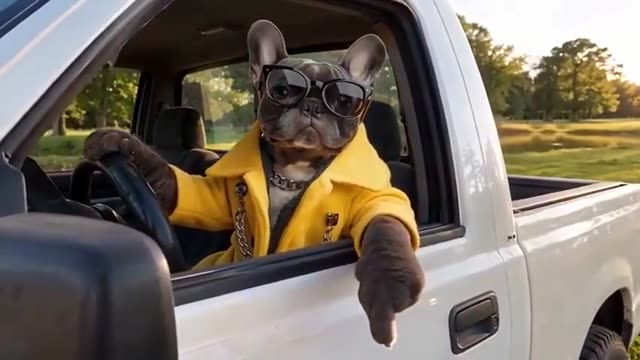
Upload one clear photo of your dog or cat in the Driver photo slot, pick 480p or 720p and pay. The studio puts your pet at the open window of the white pickup for the 15-second State Property exchange: the "State?" pause, the private property correction and the send-off, with its mouth moving to a newly generated voice.
There is no separate pet mode. The same preset takes a person or a pet; the photo decides who drives.
Step by step
The whole thing takes a minute of your time; the clip itself is made after payment.
Pick a close, well-lit photo of one pet with eyes, nose and mouth visible.
Add it to the Driver photo slot. JPEG, PNG or WebP up to 10 MB.
Choose 480p or 720p, check the total and pay.
Watch the result through before posting.
- Pick one photo where your pet's face is clear: eyes, nose and mouth visible, facing the camera or slightly turned.
- Open the studio and add it to the Driver photo slot. JPEG, PNG or WebP up to 10 MB.
- Leave the resolution at 480p, or switch to 720p for a sharper file. The length, the scene and the voice do not change.
- Check the total on the button, then pay once or use credits.
- Wait for the result page. You can reload or come back later; the same task continues.
Which photo works
The studio only sees what is in the photo, so the photo matters more than anything else.
| Photo | Works? | Why |
|---|---|---|
| Close-up, face toward the camera, good light | Best | The model can read the face and markings |
| Pet in a jacket or sunglasses | Usually | Clothing that is clearly visible tends to carry over |
| Full body far away | Weak | The face is too small to carry into the window |
| Two pets, or a pet with a person | Risky | The studio may pick the wrong face |
| Heavy filter, dark or motion-blurred | Weak | Fur color and shape get guessed |
A photo like a pet portrait against a plain background is ideal. It does not need to be taken in a car.
What the result does
Your pet sits at the open driver window of a white pickup parked on grass, with the person it is turning away off camera. The clip is vertical, 9:16, and 15 seconds long. The voice is newly generated for the clip; it is not the original recording.
Generated video can get details wrong: a paw that turns into a hand, markings that shift, or a mouth that moves a little out of step. A closer, clearer photo usually helps. An imperfect result is still a delivered clip, so watch it through before you post.
Cats and other animals
Cats work the same way as dogs and are among the most-shared versions of the trend. Other animals have a face the model reads less reliably, so the result may look less like your pet. A rabbit or a parrot is worth trying only if you are fine with a stranger-looking driver.
Before you post
Label it as an AI remake. Use only photos of your own pet, or with the owner's permission. If you want the original audio rather than a new voice, an editor template is the better tool; the comparison page lays out the options.


